Release Notes Incorta v8.0.0 - 2026.8
Release date: August 5, 2026
Starting with this release, Incorta adopts semantic versioning for its release naming, aligning with the widely used versioning standard that communicates the nature and compatibility of changes directly through the version number. Each release name follows the major.minor.patch-YYYY.M format, appending a time-based reference for the year and month of the release.
For more details, refer to the New Release Framework Community announcement.
Note that this release is identified as v8.0.0 - 2026.8 on the platform's Login and About pages. On the Cloud Admin Portal, the same release is displayed as 2026.8.0.
Release highlights
The v8.0.0 - 2026.8 release builds on all features and fixes previously introduced in the 2026.3.0 release and its service packs through 2026.3.7. This release delivers major runtime upgrades, next-generation AI capabilities, expanded data governance, and a broad set of analytics and platform improvements.
Next Generation of Incorta Intelligence
Incorta Intelligence continues to expand past conversational assistance with an increased focus on generative, app-driven analytics with governed, reusable context.
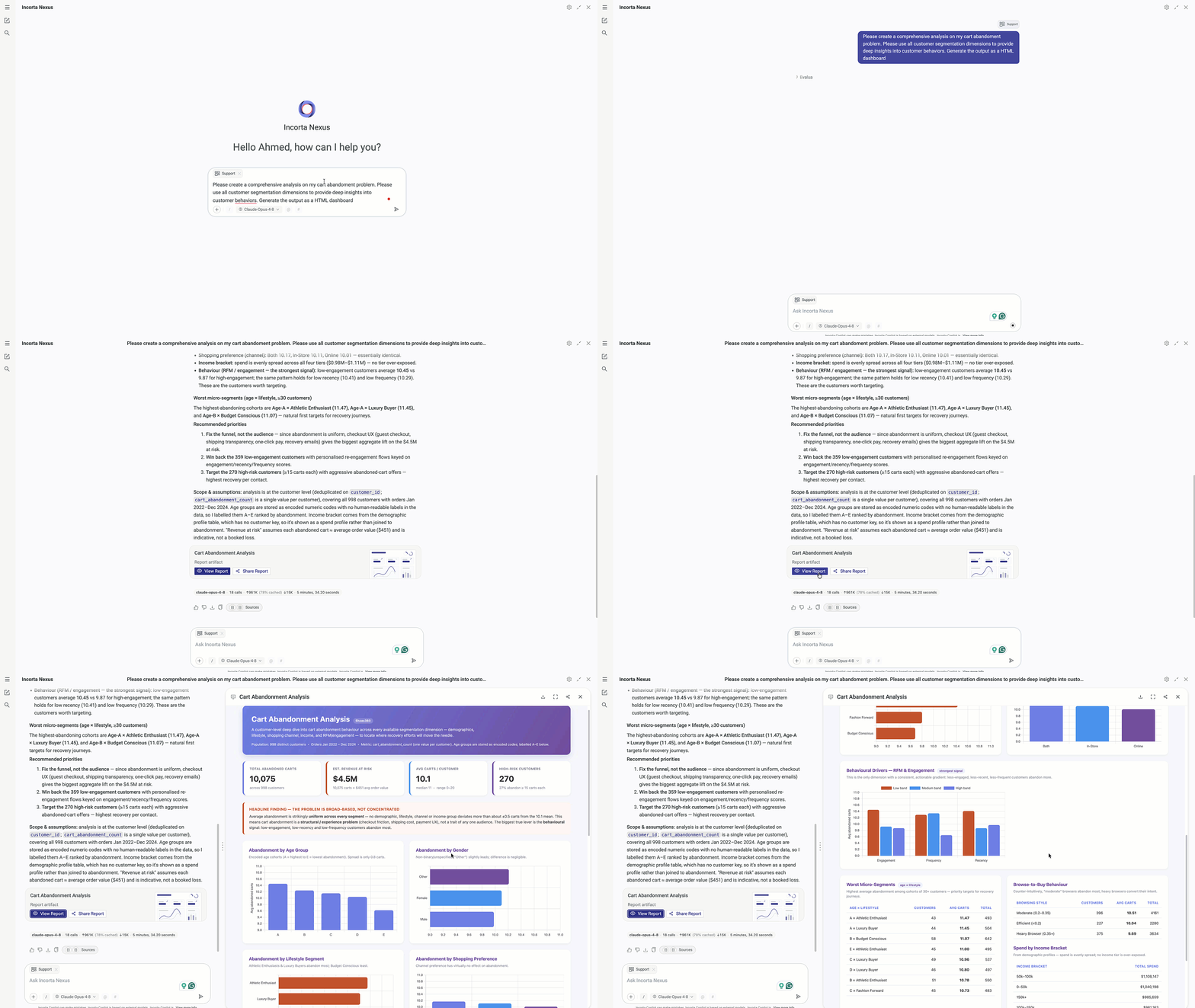
- Smart Agent generates native insights plus interactive HTML reports, PowerPoint decks, and Excel workbooks, with support for external models like Gemini
- AI Apps (Preview) let you build and run interactive applications as an extensible, richly formatted content type native to Incorta.
- AI Containers bundle Business Views, Insights, and Knowledge Store resources into reusable, shareable context
- Previous conversations are now visible, fully resumable, and have additional controls like renaming and deleting conversations.
Visualization and Analytics
This release makes dashboards faster to read and easier to tailor, giving both authors and viewers richer control over how data is visualized, formatted, and personalized.
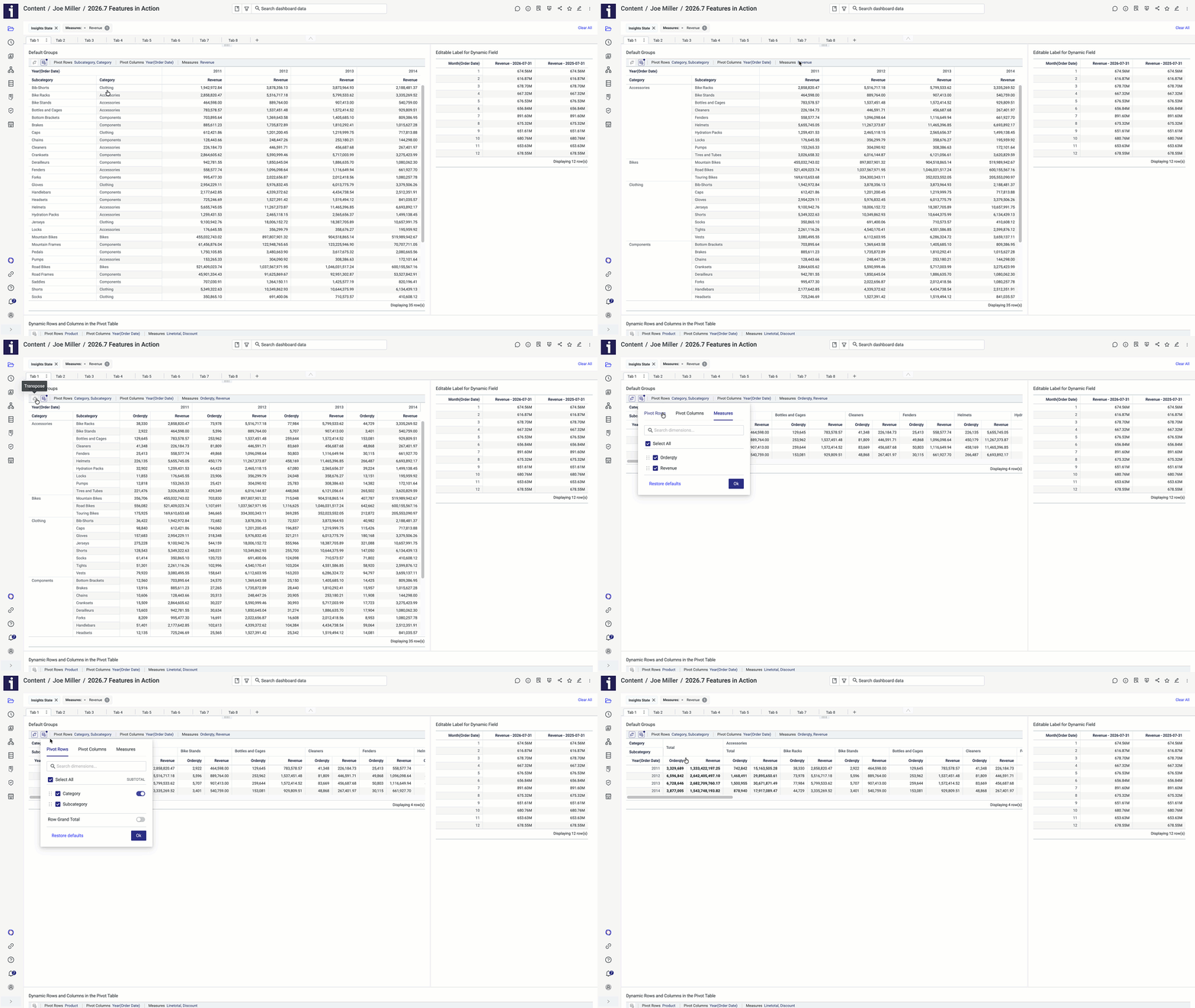
- Enhanced dashboard consumer personalization for Pivot and Aggregated tables, allowing viewers to transpose rows/columns and show or hide totals and subtotals without editing the table configuration
- New Derived Variables (preview) calculate one value, like the overall average, and let every row use it, so you can easily show how each record compares to the average without redoing the math.
- Gradient conditional formatting — shade values along a Minimum / Mid Point / Maximum color scale
- Enhanced table styling controls customize or remove border colors, manage padding, auto-hide unused scrollbars, and fill the full insight space
Deeper Governance and Security
Incorta continues to invest deeply in the security and governance platform, ensuring that we are capable of adhering to the most robust and mature organizational governance frameworks and government policies
- New Policy Center (Preview) for centralized, structured data-policy definition and management
- External Assets extend lineage upstream and downstream for asset visibility beyond Incorta
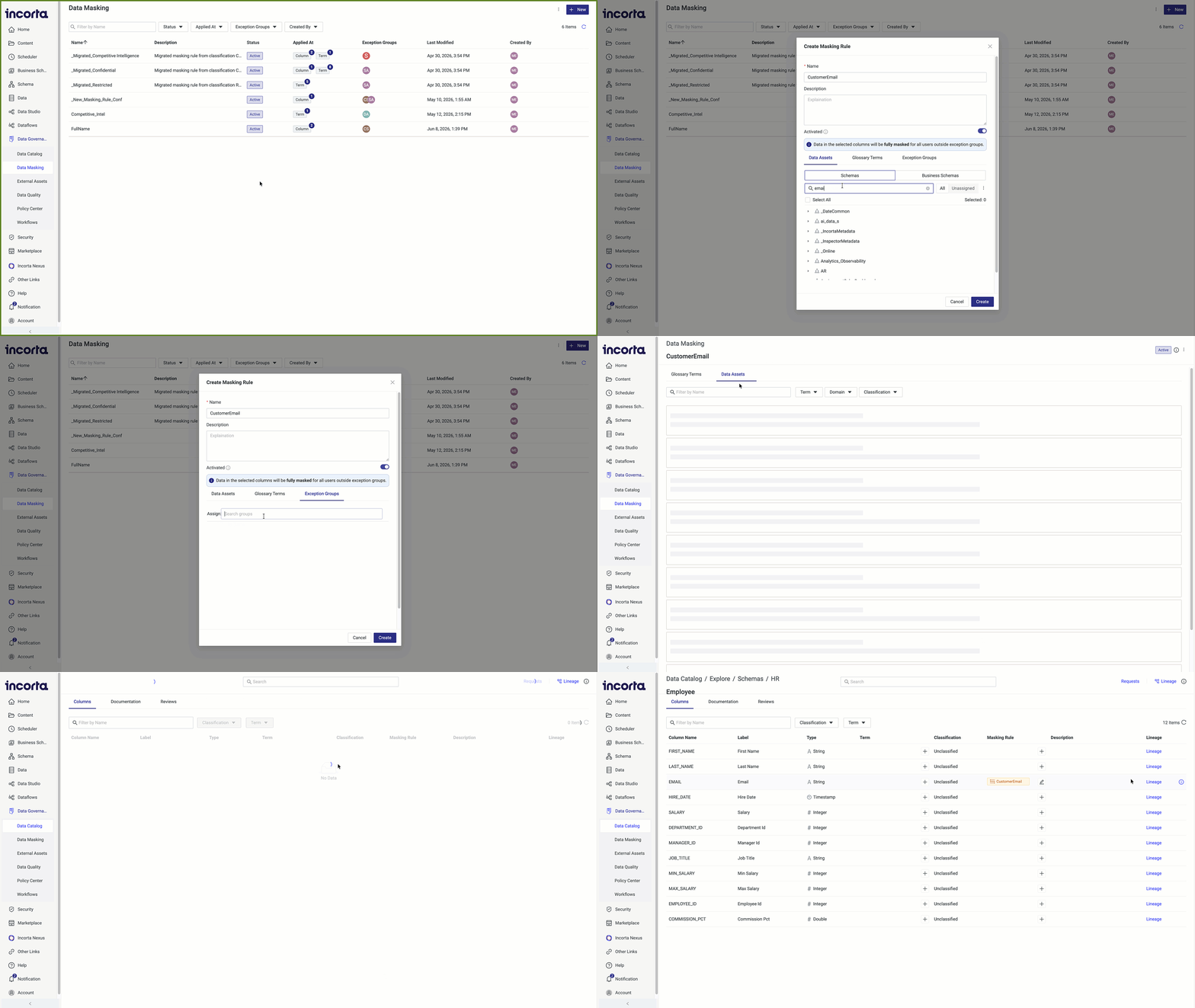
- New refined Data Masking and classification, and enforced in SQLi queries
- Customizable Data Governance workflows (Preview), built from templates or from scratch with no coding
- Data Quality and Metadata Quality score visibility across catalog assets
Enhanced data management
Making your data available when you need and how you need it continues to drive our roadmap for data management. In this release, we are happy to announce transformational capabilities for managing existing data and analyzing data.
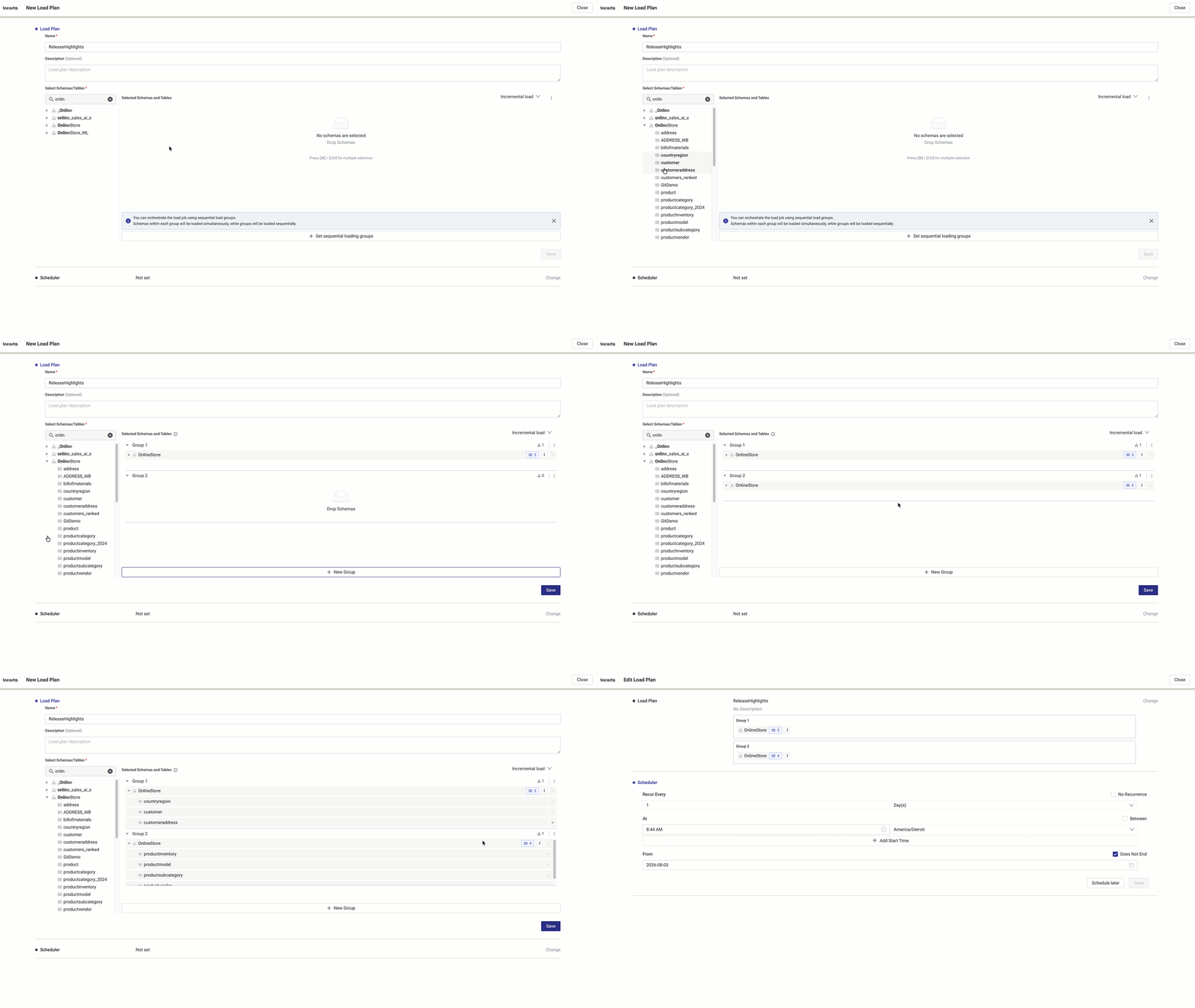
- Granular table-level scheduling within load plans to reduce load times
- Analyzer views become verified views, reusable by BI tools, Business Notebooks, and Incorta AI
- Databricks Unity Catalog volume support, including cross-cloud transfers with no SAS token required
Platform and Runtime Modernization
Major runtime upgrades bring stronger performance, security, and SQL compatibility across the platform.
- Upgraded to OpenJDK 21, Spark 4.0.2, Scala 2.13, Python 3.12.3, and Parquet 1.15.2
- Java 21 is now mandatory, including for the Data Agent
Upgrade considerations
Upgrade considerations for previous releases also apply to this release unless stated otherwise.
Supported Java versions
This release exclusively supports OpenJDK 21. It is mandatory to install or upgrade to the supported Java version before installing or upgrading to the v8.0.0 - 2026.8 release.
Adopting OpenJDK 21 brings improved garbage collection performance, reduced memory overhead through virtual threads, and enhanced security with the latest cryptographic standards. Java 21 is also the runtime required by Spark 4, ensuring full compatibility across all upgraded components in this release.
It is recommended to upgrade installed connectors to version 2.8.0 or later for better compatibility with JDK 21.
GCS connector and Hadoop upgrade
The Google Cloud Storage (GCS) connector has been upgraded to version 3.0.11 and Hadoop to version 3.4.1.
On-Premises GCS installation
For On-Premises clusters with GCS storage, add the following property to the core-site.xml, then run the Python scripts to propagate the updated file to all required locations:
<property><name>fs.gs.auth.type</name><value>APPLICATION_DEFAULT</value></property>
To allow Advanced SQLi to read and write data from and to Incorta storage, for example, when reading Incorta tables and views when the Spark scalability mode is set to parquet-preferred, or when logging Advanced SQLi query details in the kyuubi_audit folder, you must copy the updated core-site.xml file to /<incorta_installation_path>/IncortaNode/kyuubi/services/<service_GUID>/conf/, and then restart the Advanced SQLi Service.
Enhanced security by bundling Apache Tomcat v11.0.22
In this release, Incorta bundles Apache Tomcat 11.0.22 to catch up with the security enhancements and fixes in this version, ensuring a more secure and up-to-date runtime environment.
The new Apache Tomcat version has a different connector syntax for SSL. Ensure that the one available in server.xml is supported.
Old syntax example:
<Connector port="6443" protocol="org.apache.coyote.http11.Http11NioProtocol"SSLEnabled="true" scheme="https" secure="true"keystoreFile="/path/to/keystore.jks"keystorePass="yourpassword"clientAuth="false" sslProtocol="TLS"/>
Newly supported syntax example:
<Connector port="6443" protocol="org.apache.coyote.http11.Http11NioProtocol"SSLEnabled="true" scheme="https" secure="true"maxThreads="500"><SSLHostConfig><Certificate certificateKeystoreFile="/path/to/keystore.jks"certificateKeystorePassword="yourpassword"type="RSA"/></SSLHostConfig></Connector>
Runtime component upgrades
This release upgrades the following underlying runtime components:
| Component | Previous version | New version |
|---|---|---|
| Java | 17 | 21 |
| Spark | 3.4.1 | 4.0.2 |
| Scala | 2.12 | 2.13 |
| Python | 3.10 | 3.12.3 |
| Parquet | 1.12.2 | 1.15.2 |
Most customers can upgrade without modifying their MV code. However, customers who use custom code, external JARs, or external Python packages should review the compatibility notes below.
Spark 4 and Python 3.12
This release upgrades Incorta to Spark 4 and Python 3.12, delivering faster performance, broader SQL compatibility, and updated ecosystem libraries.
Before upgrading, it is recommended to run the Spark 4 / Python 3.12 issue detection tool, issue-detector.sh, to check scripts of materialized views, MV-level Spark properties, and cluster-wide Spark configuration. Resolve all reported issues before proceeding, and contact Incorta Support for upgrade assistance.
The detection tool performs static analysis only and will not catch all runtime issues. Reported findings are potential concerns, not guaranteed failures.
For more details, refer to Tools → Spark Issue Detector.
The old Python library used in the previous rerelease for data APIs for external Notebooks is not compatible with Spark 4. After upgrading to v8.0.0 - 2026.8, reinstall the Python library using this command:
pip install IncortaAnalytics/IncortaNode/bin/data_apis/python/incorta_data_apis-1.0-py3-none-any.whl
After installing Python 3.12, verify that the system commands python and python3 resolve to the 3.12 installation. If they point to a different version, set the Python 3.12 path explicitly in the CMC: Tenant Configurations > Advanced > Python Path.
PySpark compatibility
PySpark Materialized Views and notebooks may require updates for Python 3.12. Verify that any external Python packages you use support Python 3.12, including:
- Pandas 2.0.0 or later
- NumPy 1.21 or later
SparkR deprecation
SparkR is deprecated and will be removed in a future release. It remains supported for materialized views and notebooks in this release, but customers are encouraged to migrate SparkR workloads to Scala or PySpark now to simplify future upgrades.
JDK 21 and Scala 2.13
Scala Materialized Views should be compatible with Scala 2.13 and JDK 21. If your MVs or Spark applications reference external JARs, ensure those libraries also support the JDK 21 runtime before upgrading.
Cloud deployments: external Spark artifacts
For Cloud deployments, review any external Spark artifacts added through the Cloud Console, including Python packages and custom JARs, to ensure they are compatible with the updated Java (21), Scala (2.13), Spark (4.0.2), and Python (3.12.3) runtimes before upgrading.
ANSI SQL mode for Spark
Spark 4 enables ANSI SQL mode by default. To maintain compatibility with existing Incorta materialized views and notebooks, Incorta keeps ANSI SQL mode disabled by default in this release.
To enable it, navigate to CMC > Server Configurations > Spark Integration, and turn on the Enable ANSI SQL for Spark Applications toggle.
Enabling ANSI SQL mode is recommended for standards compliance. However, as it changes the behavior of certain SQL operations, particularly around null handling and error reporting, validate your existing materialized views before enabling it in production.
Parquet Libraries 1.15.2
The Parquet library has been upgraded from version 1.12.2 to 1.15.2. This upgrade delivers security fixes, improved ecosystem stability, and enhanced performance for Parquet read/write operations.
MySQL driver 9.4.0 requirements
This release requires MySQL driver 9.4.0. During On-Premises upgrades, ensure internet connectivity, or manually download the JAR and add it to your environment. Run patch-mysql.sh when prompted.
The MySQL driver is no longer bundled. You must provide your own. For details, refer to Guides → Install MySQL Driver.
After the upgrade completes, re-run patch-mysql.sh to ensure that Advanced SQLi queries run successfully.
Databricks data destination
The Send to Destination feature for Databricks now requires access to a Unity Catalog (UC) Volume when using an existing Databricks schema or table. Access to the tenant directory is no longer required, and the SAS token field has been removed from the data destination UI.
For more details, see Cloud-agnostic Databricks destination.
Data Governance considerations
This release requires updates to both the Data Quality and Data Catalog packages. Existing installations must re-import the schemas and re-run the relevant load plans to ensure accurate results.
Before importing, ensure that the Data Quality and Data Catalog load plans, and any other load plan that uses these schemas, are not running, so the schemas can be imported successfully with Overwrite enabled.
The Term ID column has moved from the dg_dq_rule table to the new dg_dq_rule_term table, both in the _incortaGovernanceMetadata schema. Re-importing the schemas below updates this automatically. If you have custom reports or queries referencing this column, point them to the new table.
Data Quality considerations
The Data Quality package is updated in this release. To ensure quality scores are calculated properly for terms and columns, the Data Quality schemas must be updated. Complete these steps:
Download and extract the Data Quality Package
Navigate to Schema > Import.
Select schemas.zip from the extracted data-quality-blueprints folder and enable Overwrite.
Navigate to Scheduler > Load Plan > Import Load Plan.
Run the Data Quality Load Plan.
For more information, refer to the Data Quality Package Installation and Configuration Guide.
Data Catalog considerations
The previous Catalog Overview Assets package is no longer compatible. To ensure accurate report results, the Data Catalog schemas must be updated. Complete these steps:
Download and extract the Data Catalog Package
Navigate to Schema > Import.
Select schemas.zip from the extracted data-catalog-blueprints folder and enable Overwrite.
Run the Data Catalog Load Plan.
For more information, refer to the Data Catalog Package Installation and Configuration Guide.
Data Masking considerations
Any Data Classification entry in the Data Catalog with the Data Masked toggle enabled is automatically migrated, along with its exception groups, to the new Data Masking tab under Data Governance.
- Migrated rules follow the naming format:
_Migrated_<ClassificationName> - The rule description includes the full path of the associated terms
This applies to both upgrades and Data Catalog imports from any environment running a version prior to v8.0.0 - 2026.8.
SQLi considerations
Masking rules that were previously not applied to SQLi queries are now enforced. After upgrading, existing reports and integrations may return masked values. Review your masking rules and role assignments before upgrading to ensure they produce the expected results.
Data agent upgrade considerations: Java 21 required
This release ships Data Agent 16.1.1. which requires Java 21 (OpenJDK 21.x or Oracle JDK 21.x). Before upgrading, verify Java 21 is installed, and JAVA_HOME points to it on every machine running the data agent. Upgrading or starting the data agent on a machine running an older Java version will fail.
The Data Agent version 16.1.1 provides multiple enhancements.
The data agent upgrade instructions for 2026.3.0 still apply.
- Customers upgrading from a release before 2025.7 must follow the steps outlined in 2025.7.1.
- Customers upgrading from a 2025.7.x or later release:
- For Incorta Cloud clusters, the data agent will be upgraded automatically during the cluster upgrade. If the data agent upgrade fails, you can trigger it again from the Cloud Admin Portal.
- For other deployments (On-Premises and customer-managed cloud clusters): Upgrade the data agent manually as mentioned in the 2025.7.1 release notes.
Behavior changes
Streamlined file upload in the Data Manager
The Upload Data Files and Upload Data Folder options are now available directly from the + New button in the Data tab. Previously, you could access these actions through the Add New Data Source flow, which required additional steps for a common task. As a result, the Data Files section has been removed from the Choose a Data Source dialog.
SQLi and PostgreSQL views
In SQLi and PostgreSQL views, the expression NULL IS NULL was incorrectly evaluated as FALSE instead of TRUE. This could occur when the expression was written explicitly in a query, or when it resulted from internal query translation. In such cases, affected queries or filters could unexpectedly return no data. This release fixes this issue. Thus, after upgrading, results for such queries may differ; previously missing rows will now be correctly returned.
CMC concurrent sessions
The Cluster Management Console (CMC) previously allowed unlimited simultaneous logins per user. This release introduces a new internal configuration to limit concurrent sessions per user with a default setting of 10 sessions. When exceeding this limit, the system automatically invalidates the oldest session. You can change the default setting by adding the cmc.maximum.concurrent.sessions property to cmc.cfg. Restart the CMC after changing this setting.
Insight hover behavior
Hovering over an insight no longer displays a border or the context menu icon, reducing visual clutter. Select More Options (⋮) to access the context menu.
Connectors Marketplace
The Select a Version drop-down list in the Connector Marketplace now displays connector versions in descending order, with the latest version at the top. By default, the list shows the 30 most recent versions, making it easier to find and select a specific version without scrolling through the full version history.
Incorta Swagger REST Public API page
You need to add your token, personal access token or OAuth 2.0 JWT, via the new global Authorize option, not the per-endpoint Authorization header field.
- Note: Swagger UI won't let you leave that per-endpoint field empty, so you'll need to enter a placeholder value there.
You no longer need to select a scheme (HTTP or HTTPS) before using the Incorta Swagger REST Public API page. The page now handles scheme selection automatically.
The Swagger JSON URL has changed from
https://<CLUSTER_URL>/incorta/api/v2/swagger.jsontohttps://<CLUSTER_URL>/incorta/api/v2/openapi.json.ImportantUpdate any existing integrations, scripts, or bookmarks that reference the previous swagger.json URL directly, as they will no longer resolve after the upgrade.
New features
- Customizable workflow management for Data Governance (Preview)
- New Policy Center (Preview)
- Policy auditing
- External Assets (Preview)
- External Assets auditing
- A new Inspector report for external assets
- Metadata Quality and Data Quality score visibility on assets
- Support for data quality rules on multiple columns and terms
- Data Masking
- Data Masking auditing
- Data masking support in SQLi
- Data Catalog report enhancement: Masking KPIs
- Knowledge Stores
- Analyzer views as verified views
- Load plan enhancements
- Cloud-agnostic Databricks destination
- Spark SQL view caching and filter execution
- Data agent enhancements
- Dashboard scheduler cleanup job
- Inspector enhancements
- Business Notebooks: folder organization, sharing, and auditing
Architecture and Application Layer
- On-demand loader architecture
- Support for Azure Managed Identity authentication
- Select MAX String Length for Schema Destinations
- Custom CSS editor
- Advanced SQLi startup health check
- Automatic cleanup of audit files
- AI Apps (Preview)
- Smart Agent for advanced generative analytics
- AI Containers for reusable Nexus context
- Nexus configuration per scope
- Automatic metadata enrichment with row and column security
- Support for larger insights in Incorta Nexus
- User and group-based access control for Nexus agents
- Incorta Nexus chat enhancements
Dashboards, Visualizations, and Analytics
- Derived Variables (Preview)
- Session variable for current tenant
- Dashboard Scheduler support for bookmarks in CSV and Excel formats
- Add open dashboards to favorites
- Copy dashboard tabs
- Waterfall charts enhancements
- Text wrapping in KPI insights
- Gradient conditional formatting
- Enhanced table styling controls
- Control table columns in view mode
- Value selection for dimension-based conditional formatting
- Insight title editing shortcuts
- Personalize Pivot tables
- Abbreviation option for Measures in Tabular insights
- Indian numbering system (Lakh format) support
Data governance
Customizable workflow management for Data Governance (Preview)
This release introduces customizable workflow management for Data Governance, enabling administrators and data governors to design, configure, and manage governance workflows directly within Incorta without coding or specialized technical resources. Key capabilities include the following:
- Create custom workflows: Build workflows from scratch, tailored to your organization's specific governance processes and business rules.
- Use prebuilt templates: Accelerate setup with ready-to-use templates for r common data governance workflows, then adjust them to fit your needs.
- Self-Service Customization: Modify and extend existing workflows at any time, without external dependencies.
Customizable Workflow Management for Data Governance is supported on Cloud deployments. Contact Incorta Support to enable the feature.
For information on configuring Customizable Workflows, refer to Guides → Configure Tenants and Guides → Configure Server.
For more information, refer to References → Customizable Workflow Management and Concepts → Customizable Governance Workflows.
New Policy Center (Preview)
This release introduces the Policy Center, a new capability within Data Governance that enables centralized, structured definition, management, and governance of data policies. Note that access is restricted to users with the Data Governor and SuperRole roles.
For more information, refer to Tools → Policy Center Manager and Concepts → Policy Workflow.
Policy auditing
Policy changes and updates are auditable through new folders in the policy_audit directory, accessible from Data > Local Data Files > data_catalog_audit, improving transparency, traceability, and visibility into policy changes.
Limitation
In this release, the Valid Until field does not trigger automatic policy expiration. It can be set on policies for tracking and reporting purposes, but automatic expiration is not supported.
For more information, refer to Audit Policies.
External Assets (Preview)
This release adds External Assets, a new capability within Data Governance that enables Data Governors to extend lineage beyond Incorta, including upstream sources such as ERP systems and data warehouses, as well as downstream tools such as BI and reporting platforms.
By integrating these external points, users gain complete end-to-end lineage visibility, extending data governance across the entire data journey. Data Catalog users can browse these assets and their lineage in view-only mode, providing full context of the data’s origin and destination.
For more information, refer to Tools → External Assets Manager.
External Assets auditing
All changes and updates to External Assets are auditable. Audit files are stored in the external_assets directory, accessible from:
Data > Local Data Files > data_catalog_audit
A new Inspector report for external assets
A new report is now available via the Inspector tool to track external assets defined in Incorta. The new report captures external asset details, including entity type, asset name and type, lineage direction (upstream/downstream), and source and target origins, enabling comprehensive lineage tracing across the entire data ecosystem beyond Incorta.
The Inspector schema and data application do not automatically include this report. To create it, run the Inspector tool, then manually edit the Inspector schemas and dashboards to add externalAssetsReport.
Metadata Quality and Data Quality score visibility on assets
Visibility into Metadata Quality and Data Quality Scores is now available across multiple asset types in the Data Catalog. Schema Managers, Data Catalog Users, Data Governors, and SuperRole users can now view overall quality scores and detailed breakdowns by data quality dimensions directly within asset views, improving transparency and enabling better data governance decisions.
This release also updates existing Data Quality schemas and introduces a new schema, quality_scores_per_asset, which calculates Data Quality, Metadata Quality, and Business Rules Compliance scores per asset. The schema is automatically included in the Data Quality load.
For more information, refer to References → Quality Scores.
Support for data quality rules on multiple columns and terms
In previous releases, a data quality rule could only be applied to a single glossary term and its associated columns. Now, a single rule can span multiple terms, multiple columns, or both. Data Governors can manage data quality more broadly from one rule definition, covering related terms and individual columns together, with less duplication and easier maintenance.
Data Masking
Starting this release, Data Masking is independent of Data Classification and available as a dedicated tab under Data Governance, providing Data Governors and Admin users with the flexibility to control exactly which columns or data terms are masked.
Data Classification moves away from controlling masking rules and is now repurposed for logically categorizing and organizing data. Columns now clearly indicate their masking status: Inherited from Term, Assigned to Column, Unmasked, or No Masking.
Existing masking configurations are automatically migrated during upgrade with no disruption to current data protection settings. Refer to Upgrade Considerations → Data Masking considerations.
For more information, refer to Tools → Data Masking Manager. For related limitations, refer to the Known Issues section.
Data Masking auditing
All masking rule changes are auditable. Audit files are stored in the maskingrules directory, accessible from:
Data > Local Data Files > data_catalog_audit
Data masking support in SQLi
Masking rules are now enforced in SQLi queries, whether from BI tools, Incorta over Incorta (IOI), or Incorta SQL tables. Sensitive data stays protected and auditable.
Data Catalog report enhancement: Masking KPIs
The Data Classification KPIs V1 report has been renamed to Classification & Masking KPIs. In addition to the existing classification insights, the report now includes new Data Masking KPIs to provide a unified view of classification coverage and masking enforcement across your data catalog.
Report data is now scoped to the current tenant, ensuring accurate and relevant results for each environment. The report enables you to:
- Review masking rules with and without associated assets, grouped by Active and Inactive status
- Track total masked and unmasked assets across the catalog
- Understand how masking is applied, whether inherited from a term or directly assigned to a column
- Identify unmasked assets by reason, such as no rule assigned or explicitly exempted from masking
- View combined asset classification and masking details in a single table for a complete governance overview
- View updated insight titles with clearer and more descriptive labels
For more information, refer to References → Classification & Masking KPIs Report.
Data management
Knowledge Stores
This release adds auditing support for Knowledge Store management operations, including creating, deleting, and editing Knowledge Stores, as well as adding and deleting files.
Audit records are stored in a new knowledge_store_audit directory within the tenant data folder under Data > Local Data Files, following the existing schema audit file naming convention.
Analyzer views as verified views
Analyzer views are now marked as verified views and synchronized to the Advanced SQL metastore, making them accessible to BI tools, Business Notebooks, and Incorta AI. Analysts can reuse existing, trusted business logic and aggregated datasets, including views that combine multiple fact tables, without re-modeling, improving the accuracy and coverage of insights delivered through Incorta AI.
After upgrading, sync the Spark Metastore to make existing Analyzer views available. Go to CMC > Clusters > cluster_name > Tenants > tenant_name > More Options (⋮), then select Sync Spark Metastore.
This step is not required if inx.sparksql.sync.periodic.start is set to true. For details, see SparkX Sync Configurations.
Analyzer views materialize all columns in the view, even if only a subset is used by the querying insight. For large views, this may increase memory consumption compared to querying a standard verified view.
Load plan enhancements
This release introduces the following load plan enhancements:
Granular table scheduling
Load plans now support scheduling individual tables within a schema instead of requiring the entire schema to be scheduled. This allows tables with different update frequencies to be refreshed independently, reducing unnecessary data loads, shortening load windows, and optimizing resource utilization.
Same schema in multiple load groups
The load plan editor now allows the same schema or table to be included in multiple load groups within a single load plan. For example, you can run a purge operation on a schema in one load group and an incremental load in another, eliminating the need to create separate load plans.
Cloud-agnostic Databricks destination
This release enables cloud-agnostic data transfers from Incorta to Databricks by using Unity Catalog (UC) Volumes as temporary storage. Data can now be transferred between Incorta and Databricks across different cloud providers, such as Incorta on Google Cloud Platform and Databricks on Azure.
By using UC Volumes, Databricks no longer requires direct access to Incorta storage, eliminating the need to configure SAS tokens and simplifying deployment across cloud environments.
The Create Volume permission is required in Databricks when using an existing schema with UC volumes.
Spark SQL view caching and filter execution
Previously, Spark SQL views were never cached: every dashboard, insight, or filter/list-of-values request re-ran the view's query on the Advanced SQL Interface engine from scratch. With this release, a Spark SQL view's result is cached on the engine after its first execution, when applicable, and reused by subsequent requests, eliminating repeated Spark executions. Cached results are automatically invalidated when data is loaded into or updated in the view's underlying schemas, or when the view itself is updated.
A new CMC configuration, Server Configurations > Incorta Labs > Execute Spark SQL view insight filters using Spark, controls where insight filters on a view's columns are executed.
- Enabled (default): Preserves the previous filter behavior; insight filters run as part of the view's query on Spark, speeding up individual insights. Each distinct filter combination is cached as a separate entry, reducing the cache hit rate.
- Disabled: Insight filters are applied after the view runs, allowing insights with different filters to reuse the same cached result and increasing the cache hit rate.
For details, refer to References → Spark SQL View Caching.
Data agent enhancements
Data agent upgrades from the Cloud Admin Portal
You can now trigger a data agent upgrade directly from the Cloud Admin Portal. A new Upgrade action is available in the Data Agents list, allowing administrators to initiate on-demand upgrades when an automatic upgrade fails or is interrupted by a network issue. To upgrade all data agents in a cluster, use the Retry Data Agent Upgrade option.
- The manual upgrade option is available on Cloud deployments when the installed data agent version is incompatible or outdated.
- The controller must be available and connected to the cluster for the Upgrade button to appear.
Persistent Custom JVM Arguments for Data Agents
Data agents and controllers now support an extra_jvm.properties file in the bin directory to define custom JVM arguments. Unlike startup script modifications, JVM arguments configured in this file are preserved across data agent upgrades, eliminating the need to reapply them after each upgrade.
Dashboard scheduler cleanup job
Completed Send Dashboard jobs previously accumulated indefinitely in the metadata database, degrading performance over time. A new Send Dashboard Job Retention Period setting is now available in the CMC > Tenant Configurations > Data Management that automatically removes completed jobs older than the configured period (default: 90 days) at Analytics Service startup, keeping scheduler tables under control without affecting active recurring jobs.
Inspector enhancements
Report enhancements
This release introduced enhancements to the following reports for better analysis:
schemaTables: Added a column for the owner email.schemaClusters: Added a column that indicates the dependency strength between schemas within a cluster. Join count now classifies schema pairs: fewer than 3 joins exclude the pair from clustering entirely, 3 to 4 joins are classified as weak, and 5 or more joins are classified as strong.
Enhanced job execution visibility in the Inspector Scheduler
To provide clearer visibility into the Inspector job statuses, two new columns are now available on the CMC > Scheduler > Inspector:
- Scheduler Status: The job's scheduling state (Active or Completed)
- Job Status: The current stage or outcome of the job's execution (Validation, Parsing XML, Generating reports, Finished, or Finished with errors)
Business Notebooks: folder organization, sharing, and auditing
Business Notebook users can now organize notebooks into folders and share notebooks or entire folders with other users, enabling collaboration. Shared folders pass their permissions down to all notebooks and subfolders, unless overridden at a lower level.
You can share notebooks and folders with other users by granting them Edit access. Users with Edit access can:
- View and edit all paragraphs
- Run paragraphs
- Clear output
- Import notes
- Save changes
Only one user can actively edit a notebook at a time, ensuring changes aren't overwritten by simultaneous edits.
- Notebook owners and users with Edit access can share the notebook with others.
- Notebook owners and admins can end the active editing session.
- Users with Edit access should have access to the underlying business schemas to run paragraphs smoothly with no issues.
Additionally, Incorta now audits Business Notebook activity, logging execution records to a notebook_audit folder under the tenant data directory. Code execution and Incorta queries are tracked in separate logs, giving admins visibility into notebook usage.
Architecture and Application Layer
On-demand loader architecture
This feature is available on Incorta Cloud Clusters only.
Incorta now supports on-demand loaders, allowing high-spec loader nodes to start automatically when needed and shut down after a configurable idle period. This helps optimize infrastructure costs and save IPUs for other workloads while maintaining load performance and reliability. This feature is especially beneficial for Incorta Cloud deployments where high-spec loaders are used for occasional, resource-intensive workloads.
The architecture introduces two loader types:
- Primary loader: A small, always-running loader for frequent workloads such as incremental loads and schema updates.
- On-demand loader: A high-spec loader for large schemas and resource-intensive workloads that starts automatically before execution and shuts down after a configurable idle period (default: 1 hour).
- To enable the feature, contact the Support team.
- To trigger automatic startup, assign the first load group in the load plan to the on-demand loader.
- If the on-demand loader does not become ready within the startup timeout (default: 1 hour), the load plan fails.
- Do not start or stop the on-demand loader manually from the CMC, as doing so bypasses the automatic cost-saving lifecycle management.
For more details, refer to Concepts → On-Demand Loader.
Support for Azure Managed Identity authentication
Incorta now supports Azure Managed Identity as an authentication method to connect to its tenant directory on Azure Data Lake Gen2 Storage. This eliminates the need to manually manage and rotate storage credentials, allowing Incorta to authenticate securely using an identity assigned directly to the Azure resource.
To enable Managed Identity authentication for your tenant, you need to edit the core-site.xml file.
For details, refer to Configure a Tenant on ADLS Gen2 > Managed Identity Authentication.
If you switch your tenant to Azure Managed Identity, upgrade the following connectors to a compatible version; otherwise, they will fail.
Affected connectors:
- Amazon Web Services (AWS) S3
- Apache Hadoop (HDFS)
- Apache Kafka V1
- Box
- Data Lake Local Files
- Dropbox
- File System (Local Files)
- Freshservice
- FTP
- Google Cloud Storage (GCS)
- Google Drive
- Microsoft Azure Data Lake Storage Gen2 (ADLS Gen2)
- Microsoft OneDrive
- Microsoft SharePoint
- NetSuite Web Services
- Oracle Cloud Applications (UCM)
- Oracle EPM
- Salesforce
- SFTP
Select MAX String Length for schema destinations
When sending data to Azure Synapse or Microsoft Fabric destinations, string columns were automatically mapped to fixed-length data types. Columns containing values that exceeded the configured limit caused ingestion failures or silent data truncation, with no way for schema managers to override the behavior for known large-text columns.
Schema managers can now set the Default String Length to MAX when configuring an Azure Synapse or Microsoft Fabric data destination for a schema. Selecting the Set to MAX option maps string columns to the MAX data type supported by the destination, eliminating truncation errors for large or unbounded text values. When Set to MAX is not selected, a custom numeric length can be entered instead, with the field automatically clamping values to the valid range for the selected destination.
Custom CSS editor
A new Custom CSS Editor is now available in dashboards, providing CSS syntax highlighting, support for classes and CSS variables, inline validation with error markers, and live preview capabilities.
Advanced SQLi startup check
The Advanced SQLi service now verifies that the Analytics Service is fully up and running before accepting any connections. If the Analytics Service is not yet ready at startup, Advanced SQLi retries automatically until the service becomes available or a timeout is reached (default: 10 minutes), after which it shuts down and logs a clear error message.
This prevents Advanced SQLi from starting in an incomplete state that would silently reject incoming connections.
The Analytics Service must be started before Advanced SQLi. While Advanced SQLi is waiting for the Analytics Service to become available, it does not accept connections.
Automatic cleanup of audit files
Incorta now supports automatic audit file cleanup, eliminating the need for manual disk management. Enable the Audit Cleanup Job from CMC > Server Configurations > Tuning, set a retention period, and Incorta will periodically delete audit files older than that period.
The following settings are available:
| Configuration property | Description | Default |
|---|---|---|
| Audit Cleanup Job | Enables or disables automatic audit file cleanup. | Disabled |
| Audit Retention Period | The number of days to retain audit files before deletion. | 365 days |
| Audit Cleanup Job Interval | How frequently the cleanup job runs. | Every 7 days |
Changes to these settings require restarting all services.
These settings are available to CMC Admins only. For Incorta Cloud clusters, contact the Support team to enable and configure the feature.
User Session Management (Preview)
This release provides visibility into and control over active user sessions. A new Concurrent Sessions section, available in the logged-in user's profile under the Security tab, lists the user's active sessions. Each session entry shows the session source: device, browser, and operating system, in addition to the session creation time. The current session is clearly marked with a (Current) flag.
Users can revoke their own sessions on demand:
- Revoke: Ends a specific active session directly from the sessions list.
- Revoke all sessions: Ends all active sessions at once, except the current one.
In addition, a user's sessions are automatically revoked when security-relevant events occur:
- Self-service password change: All sessions are revoked except the current one.
- Admin password reset: All of the user's sessions are revoked.
- Account deactivation: All of the user's active sessions are terminated.
To enable this feature, in the CMC, go to Server Configurations > Security, and then turn on Enable Sessions Tracking and Control.
Incorta AI
AI Apps (Preview)
Incorta now supports AI Apps, a native capability that enables building and running interactive applications directly within Incorta, eliminating the need for external hosting or custom integrations. Apps query live data through a purpose-built SDK, run under the signed-in user’s Incorta identity with row-level security enforced end-to-end, and execute in isolated sandboxed environments with automated security scanning prior to publication. Each app has its own lifecycle, versioning, and persistent storage, with an AI-assisted kit to accelerate development in your local environment.
AI Apps is an early Labs/Preview feature available on Cloud deployments. It is metered on a consumption basis and is not yet covered by standard production SLAs. Contact your Incorta Account Executive to enable it for your cluster.
The initial version of AI Apps is targeted at developers or technically proficient users who can write, understand, and maintain code. While the AI-assisted development kit accelerates development by connecting a coding agent to live MCP tools, platform rules, and templates, it is designed to support someone able to review, debug, and maintain the generated code, not to serve as a no-code/low-code solution for non-technical business users.
This release provides managed connectivity between user apps and Incorta. The platform is responsible for establishing and maintaining that connection. It does not include troubleshooting or repairing user app code; building, testing, and maintaining the app remains part of the app developer’s workflow.
For details about the feature and how to use it, refer to Concepts → AI App and Tools → AI App Manager.
Smart Agent for advanced generative analytics
This release introduces Smart Agent, Incorta Nexus's next-generation generative analytics agent that enables analyzing data, generating native Incorta insights, and creating interactive HTML reports, PowerPoint presentations, and Excel workbooks. Smart Agent also supports integration with AI models, including Gemini and Claude, enhanced reasoning capabilities, and AI Containers for context-aware conversations. For more information, refer to References → Smart Agent
AI App Deployment with Smart Agent
Smart Agent provides a streamlined experience for deploying AI Apps from reports in Incorta AI chat. It automates the application generation, testing, and publishing process, while ensuring that deployed applications retrieve live Incorta data and respect user access permissions.
For more information, refer to References → AI App Deployment with Smart Agent.
AI Containers for reusable Nexus context
This release also introduces AI Containers for creating reusable and customized AI workspaces by combining Business Views, dashboard insights, Knowledge Store resources, and custom instructions. AI Containers can be shared with users and groups, providing governed, consistent context for Incorta Nexus conversations while respecting existing access permissions.
For more information, refer to Concepts → AI Containers and References → AI Containers Configuration Guide.
Nexus configuration per scope
Nexus now supports per-scope configuration, enabling administrators to customize agent settings for specific users or groups. Per-scope configuration provides control over agent visibility, access, default agents, model settings, and other options, with per-scope settings taking precedence over global configuration. This includes the ability to show or hide Smart Agent token usage metrics for specific users or groups.
Automatic metadata enrichment with row and column security
Incorta Nexus now automatically generates enriched metadata for Incorta AI-enabled datasets to improve semantic search and SQL generation while respecting row-level security and column masking.
Support for larger insights in Incorta AI Chat
Incorta AI Chat now supports significantly larger insights, enabling analysis of high-volume datasets and notifying users when an insight exceeds the supported size.
User and group-based access control for Incorta AI agents
This release supports user and group-based access control for individual Incorta AI agents. CMC admins can configure access by setting allowed_users or allowed_groups in the agent's serverSpecs under Advanced Configurations.
Incorta AI chat enhancements
This release provides major usability and workflow enhancements to Incorta Intelligence chat, focused on improving continuity, discoverability, and user control.
Agent enhancements
Faster responses in quick mode, along with improved capabilities for deeper reasoning in more advanced scenarios.
Resumable chats
Resume any previous chat session and continue long-running tasks without losing context.
Chat search
A new global search bar to search across session titles, questions, and responses, making it easier to locate past conversations and analysis.
Email reports
Share generated HTML reports directly via the Incorta email service. To share a report, select Share Report, enter the recipient’s email address, then use the dropdown to choose To, Cc, or Bcc. Select Share to send the email with the report (similar to the dashboard sharing behavior).
Editable session titles
Rename chat sessions for better organization and easier navigation. To rename a chat, in the history sidebar, select More Options (⋮) > Rename Chat to modify its name, then select Save.
Chat session deletion
You can now delete individual chat sessions from your Nexus chat history. To remove a conversation, select More options (⋮) > Delete next to the chat.
Chat history enhancements
Improved chat history sidebar usability with:
- Time-based grouping, for example, Today, Yesterday, Previous 7 Days
- Clear status indicators, including Completed or Awaiting Response
- Highlighting of unread messages for better visibility
Control of table and chart display order
Control the default order of tables and charts in query results. By default, results now open in table view for easier data validation, while charts are generated in the background and can be accessed on demand. Admins can configure the default view, table-first or chart-first, from the CMC.
Dashboards, Visualizations, and Analytics
Derived Variables (Preview)
You can now create derived variables, which are dynamic variables calculated from aggregated formulas such as AVG, MAX, MIN, and SUM. Derived variables automatically update as dashboard filters change and can be used for filtering and conditional formatting. For example, calculate the average monthly spend across all customers as a derived variable, then reference it to compare each customer's spend against that value to highlight customers spending above or below the average.. To create a derived variable, in the dashboard, select More Options (⋮) > Manage Dashboard Filters and Prompts > Derived Variable.
For more information, refer to Concepts → Derived Variable. For limitations, refer to Limitations and Known Issues.
Session variable for current tenant
Session variables now include $tenantname, which returns the logged-in user's current tenant, enabling tenant-specific filtering for analytics and governance use cases. This ensures results, such as KPIs and metadata, are scoped to the relevant tenant. The variable name must be in lowercase and is not supported in formulas within physical schema tables or load filters.
Dashboard Scheduler support for bookmarks in CSV and Excel formats
You can now apply bookmarks when scheduling a dashboard or an insight to be sent or exported as Excel or CSV files, and the generated output honors the selected bookmark. This ensures consistent, accurate, and filter-ready exports across all supported formats.
Add open dashboards to favorites
This release supports adding a dashboard to favorites directly while it is open, eliminating the need to close the dashboard first.
Copy dashboard tabs
You can now copy an entire dashboard tab, including all its insights, in a single action. Select Make a copy from the tab's More Options (⋮) menu, then choose the target dashboard.
Waterfall charts enhancements
This release introduces a new Dynamic Visible Range option in Waterfall charts to improve the visibility of smaller bars, along with multiple usability and rendering improvements, including maintaining a minimum visible break-by group when hiding the first group, proper date formatting in subtotal bar titles, and additional chart rendering improvements.
Text wrapping in KPI insights
Long labels in KPI insights now wrap onto multiple lines, and the insight height adjusts automatically to fit the wrapped text instead of displaying a horizontal scrollbar.
Gradient conditional formatting
This release introduces support for gradient-based conditional formatting. In the Conditional Formatting section of the pill properties, for Type, select Gradient, then specify the Minimum, Mid Point, and Maximum colors to create a color scale. Each data point is automatically colored based on where its value falls within the selected range.
Gradient conditional formatting is supported for the following insights: Listing Table, Aggregated Table, Pivot Table, Bar, Column, Tornado, Pie, Donut, Funnel, Pyramid, KPI, Tag Cloud, Treemap (data point colors only), and Solid Gauge.
Enhanced table styling controls
This release includes additional styling controls in the table settings, allowing you to customize or remove border colors and manage bottom padding. Tables now automatically hide unused scrollbar areas and occupy the full insight space without default padding.
Control table columns in view mode
This release introduces column reordering for table insights while viewing a dashboard, making it easier to customize the column order for analysis.
Value selection for dimension-based conditional formatting
When configuring conditional formatting for a dimension column, you can now select values from a list instead of entering them manually.
Insight title editing shortcuts
The Analyzer now supports easier editing of insight titles. Select the title field in the Settings panel or, in Preview mode, select the area at the top of an insight without a title to open the rich text editor.
Personalize Pivot tables
Pivot tables now include personalization controls to transpose rows and columns and show or hide totals and subtotals without editing the table or opening the Analyzer. To enable this feature, toggle on View Mode Transpose under Settings → Toolbar.
Abbreviation option for Measures in Tabular insights
You can now configure measure columns in Tabular insights to display large numbers using standard abbreviations, such as K (thousands), M (millions), and B (billions), enhancing table readability. For example, 15,400,000 can be abbreviated to 15.4M.
Limitations:
- When using the Auto abbreviation option, Excel exports do not retain the abbreviated display format and include only the original raw data.
- The abbreviation option is not available in the Business View format.
Indian numbering system (Lakh format) support
Tables and KPI insights now support the Indian numbering system, allowing numbers to be displayed using the lakh/crore format (for example, 1,00,000 for one lakh). A new Format System selector in the Format section of the Analyzer lets users choose between International (the default) and Indian. Selecting Indian enables lakh/crore comma separation and abbreviations, supports Indian Rupee (INR) formats, and ensures consistent formatting across totals and subtotals.
Limitations:
- Chart visualizations do not support the Indian numbering system.
- The Format System selector is available only at the insight level in the Analyzer, not at the Business View level. Business Views support Rupee currency formats but not lakh/crore comma separation.
- Excel scheduled reports and manual downloads do not honor the Indian numbering format due to Excel format constraints.
As with all formats in the system, public API responses and CSV exports return raw, unformatted data.
Additional enhancements and fixes
Beyond the new features mentioned above, this release includes the following enhancements and fixes that improve the stability, reliability, and overall performance of Incorta.
Enhancements
| Description | Area |
|---|---|
| A new version of the Incorta custom Kyuubi Hive JDBC driver, 1.11.1.1, is now available for connecting Tableau to Incorta via Advanced SQLi, with several bug fixes and security updates. Upgrade recommended While versions 1.10.2 and 1.7.1 will continue to work, upgrading to the latest version, 1.11.1.1, is strongly recommended to take advantage of the latest fixes and updates. For details on installing the new version, refer to Configure Tableau to connect to Incorta. | Advanced SQLi |
| This release enhances external tables by adding full support for Delta Lake deletion vectors, improving compatibility with modern Delta Lake features. | External Tables |
| This release enhances Parquet reading by optimizing metadata handling, resulting in lower memory usage and faster ETL job execution. | Loader Service |
| This release enhances Parquet reading by optimizing metadata handling, reducing memory usage, and improving ETL job performance. | Parquet Reader |
Fixed Issues
| Description | Area |
|---|---|
| Tenant re-import into the same Oracle-backed cluster could fail with a database error when the original tenant still existed. | Analytics Service |
| In the Analyzer view, issues occurred with Table Footer and Outer Border rendering, including duplicate total rows, visible scrollbar padding with totals enabled, and loss of custom outer border color after changing table density. | Analyzer |
| Ungraceful service shutdowns could leave version locks unreleased in the database, preventing the cleanup job from deleting old file versions from disk. The cleanup job now automatically removes old file version locks held by services that have been inactive for more than 2 days, allowing old file versions to be removed. | Cleanup job |
Aggregated tables downloaded to Excel applied incorrect conditional formatting when the rule used the Based On field. | Dashboards |
| Dashboards and folders on iPad Safari required a double tap to open instead of a single tap. | Dashboards |
| A single data agent instance serving a large number of tenants intermittently reported a “DA not reachable” error for some tenants due to an internal limit on concurrent control connections. The fix raises the limit to accommodate large multi-tenant deployments. | Data Agent |
| Persistent Nexus Chat history could remain accessible after expiration, API key revocation, or user deletion. Automated chat history purging was added with configurable retention policies and cleanup of expired sessions, messages, and related insight data. | Incorta Nexus |
| Column search in Incorta Nexus did not always return all expected results. | Incorta Nexus |
| Attaching files as context to blank sessions was not tracked correctly. | Incorta Nexus |
In SQLi and PostgreSQL views, the expression NULL IS NULL was incorrectly evaluated as FALSE instead of TRUE. This could occur when the expression was written explicitly in a query, or when it resulted from internal query translation. In such cases, affected queries or filters could unexpectedly return no data. Warning: Upgrade consideration After upgrading, results for such queries may differ; previously missing rows will now be correctly returned. | SQLi |
| In Combo Dual Axis charts, configured Y-axis minimum and maximum values did not apply correctly. The chart now respects the specified minimum and maximum values. | Visualizations |
| Opening and saving a measure formula in Insight edit mode could cause incorrect sorting when both the measure and dimension used formulas. | Visualizations |
The Insight Query endpoint returned a null value for the field parameter in case of formula columns. The endpoint now has a new optional boolean parameter, includeFormulaText, in the query request. When set to true, the formula expression is included in the response alongside the data values. | Public API |
| The Insight Query endpoint returned an incorrect row count for insights with dynamic hierarchies. | Public API |
Known Issues
| Issue | Workaround |
|---|---|
| SSO login would fail after the upgrade if Distributed User Session is enabled for the cluster. | In CMC > Clusters > <your_cluster> > Edit Cluster, disable the Distributed User Session option, and then enable it again. Resolved in Service Pack 12 (v8.0.2) |
When importing a catalog exported from v8.0.0 - 2026.8 into another v8.0.0 - 2026.8 environment, the Catalog Import Validation dialog incorrectly flags classifications_inclusions.csv as missing. This file no longer exists in catalog exports, as Data Masking has been decoupled from Data Classification in this release. | Select Ignore to proceed. This error can be safely dismissed and has no impact on the import outcome. |
| When a masking rule is assigned to a glossary term with no linked columns, the rule does not appear in the Masking Rules without Assets insight or on the dashboard. As a result, active and inactive masking rule totals may be inaccurate. | Ensure all terms associated with Masking Rules have at least one linked column, or verify rule assignments directly from Data Governance > Masking Rules. |
| When selecting Knowledge Stores from multiple pages and performing a delete action, the deletion applies only to stores selected on the current page, not to all selected stores across pages. |
For all of the known issues and workarounds in Incorta’s latest releases, refer to Known Issues.