Concepts → Customizable Governance Workflows (Preview)
A Workflow is an automated sequence of steps that executes in response to a governance action in Incorta. Workflows enable Data Governors to orchestrate approvals, notifications, integrations, and metadata updates by connecting Incorta to external systems via webhooks.
- Customizable Workflow management for Data Governance is available starting v8.0.0 - 2026.8.
- This is a Preview feature. Behavior and access points may change in future releases.
How Workflows integrate with Incorta
When a governance action occurs in Incorta (such as a user requesting data access), the Data Governance engine fires an HTTP webhook to the n8n Workflow Runner. The webhook URL is constructed from cluster-level connection settings (scheme, host, port) plus a tenant-level webhook path configured in CMC.
The n8n runner receives the webhook, matches it to the corresponding workflow, executes the workflow logic, and returns the result to Incorta.
Incorta governance action → HTTP webhook → n8n Workflow Runner → Execute workflow → Return result
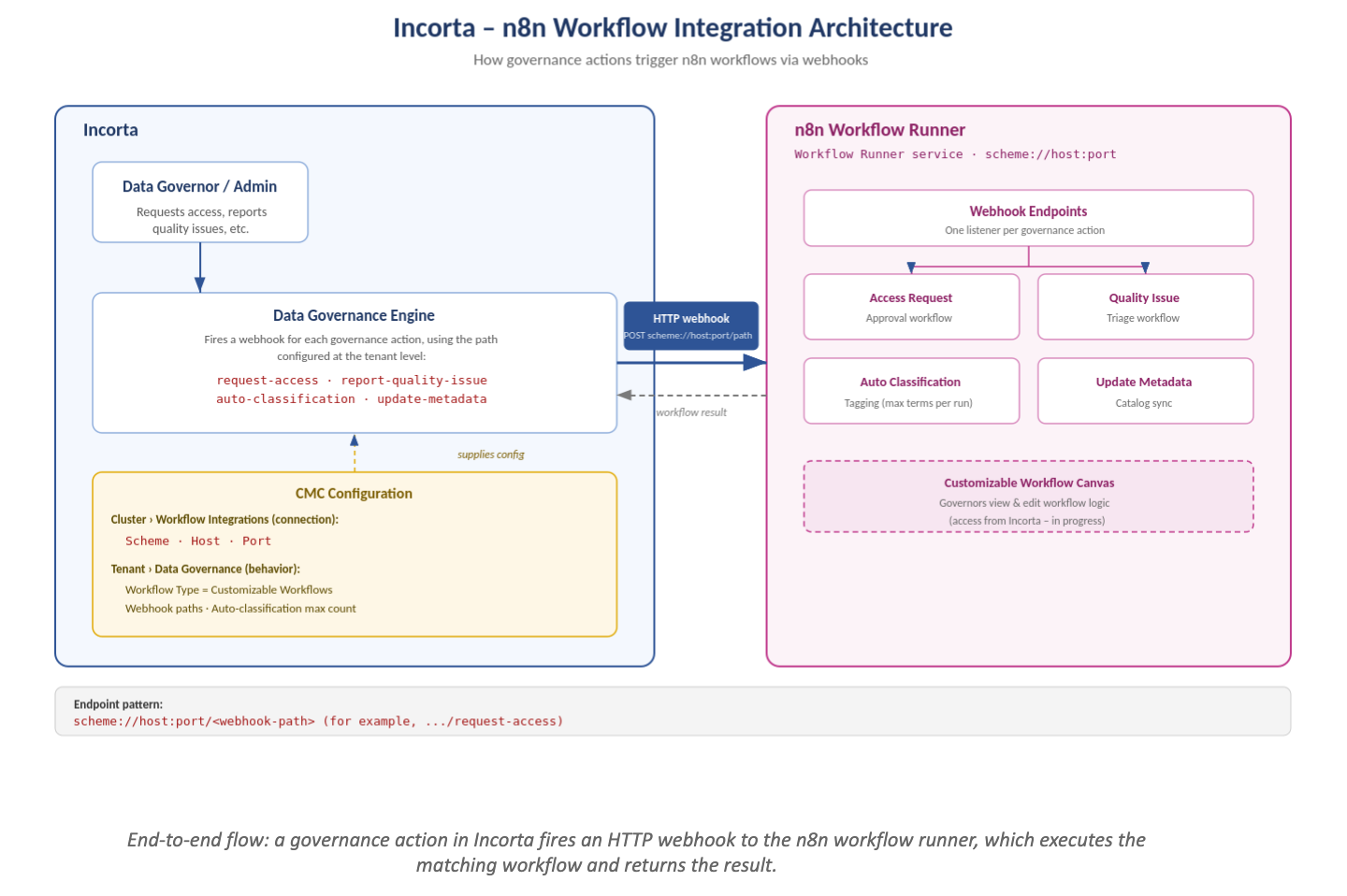
Workflow components
A workflow consists of:
- Trigger: The event that starts the workflow (webhook call, schedule, manual execution, etc.)
- Nodes: Individual steps representing actions or integrations (send email, create Jira ticket, conditional logic, etc.)
- Edges: Connections between nodes showing the flow of execution
- Canvas: Visual workspace where nodes are arranged and edited
Available templates
Incorta includes four pre-built workflow templates:
- Update Metadata: Review and publish metadata changes with approval gates
- Request Asset Approval: Multi-level approval workflow for data assets with notifications
- Report Quality Issue: Capture quality issues and create tracking tickets in Jira
- Auto Classification: Use AI to automatically classify data
Execution
Workflows can be triggered through webhooks, schedules, app events, form submissions, manual execution, or other workflow calls. All executions are logged with timestamps, status, and detailed step-by-step logs accessible in the Executions tab.
External integrations
Workflows authenticate with external systems (Jira, email, Google Gemini, APIs) using encrypted credentials managed centrally by n8n and reusable across multiple workflows.
Best practices
- Use templates as starting points: Pre-built templates are optimized for common scenarios; customize them rather than building from scratch when possible.
- Use sticky notes for documentation: Add sticky notes to the canvas and document complex logic and decision points.
- Monitor execution logs: Review the Executions tab regularly to catch errors and optimize performance.
- Secure credentials: Use the Credentials panel to store and manage API keys and tokens securely.
- Plan approval workflows carefully: Multi-level approval workflows, such as Request Asset Approval, can create bottlenecks. Ensure clear escalation and timeout policies.