Enable Business Views for Incorta Nexus
Using business views as context within Incorta Nexus Chat involves two steps: verifying the view to ensure it meets the verification criteria, and enabling the verified view for Nexus within the Business Schema.
A verified view is a Business Schema View that the Incorta Analytics Engine has validated for SQL compliance and stability. The verification is mandatory for leveraging Incorta Nexus, as it ensures the view is a reliable and trusted data source for AI-driven insights. This process ensures the view has been tested, enforces security measures, and delivers accurate, trustworthy results for AI-driven analytics within Incorta Nexus.
Prerequisite
- Have Edit access permissions to the associated business schema(s)
Verification criteria
- A verified business view displays a green circle with a check mark in the Business Schema Designer.
- An unverified business view displays a grey circle with a check mark.
- Hover over the grey circle and select Show Details to see the reason why the view is not verified.
- If there are multiple reasons, only the first encountered reason is displayed.
| Criterion | Constraint (Must NOT Contain) | Requirement (Must Have) |
|---|---|---|
| Formula Complexity | Formulas that reference columns from Analyzer Views, Spark SQL Views, or PostgreSQL Views. | Simple formulas based on base table columns or other simple Business View columns. |
| Aggregation | Any aggregation functions. For example: SUM(), COUNT() | Only return granular data rows. |
| Valid Query Plan | No valid path connecting all columns. | A clear path back to the source data, met by either: a. An explicitly defined base table, or b. A valid implicit base table connecting all columns in the view. |
A Spark SQL View (available starting 2024.7.x) is considered a Verified View by default.
Enable a view for Nexus
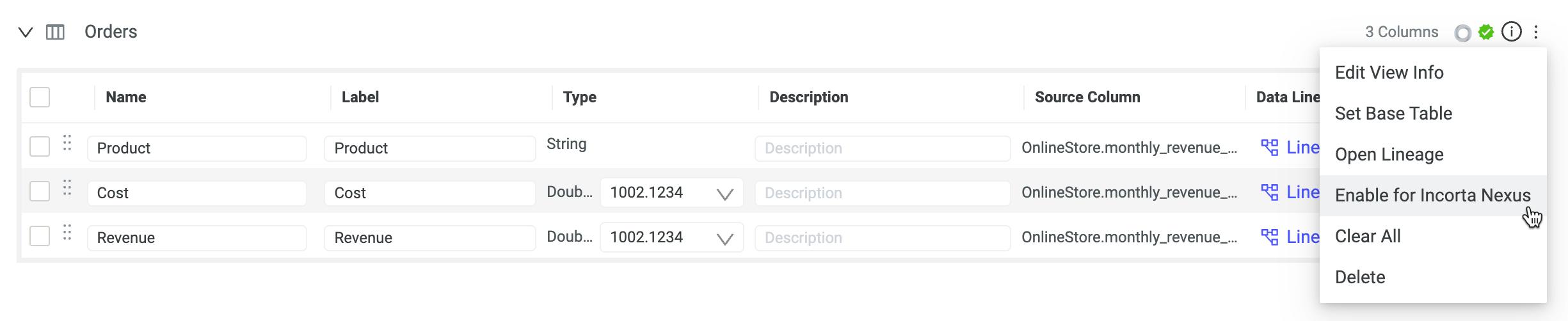
You can enable views with edit access to the parent business schema. For a view to be eligible for Nexus, it must be a verified view. If the view is verified, the view can be enabled, completing the following:
- Edit the business schema.
- Select More options (⋮) for the verified view.
- Select Enable for Incorta Nexus.
- Save the business schema.