Incorta Nexus Business View Metadata Assistant
Incorta Nexus enables you to evaluate the quality of metadata in business views and provides recommended improvements. It analyzes column names, descriptions, and formats, highlights inconsistencies, and provides clear recommendations to enhance clarity and usability. Nexus also allows you to automatically generate labels, descriptions, and formats, making it easier to standardize metadata and maintain clean, user-friendly business views.
Prerequisite
Generate Metadata
For information on generating metadata for a business view, refer to Incorta Nexus Metadata Tune.
Implement suggestions
Once a report is generated, you can automatically apply some of Nexus' suggestions to a business view as follows:
Select the target Business View, and then select Edit.
Select one or more columns to improve.
Select the Generate/Suggest button at the top right of the screen.
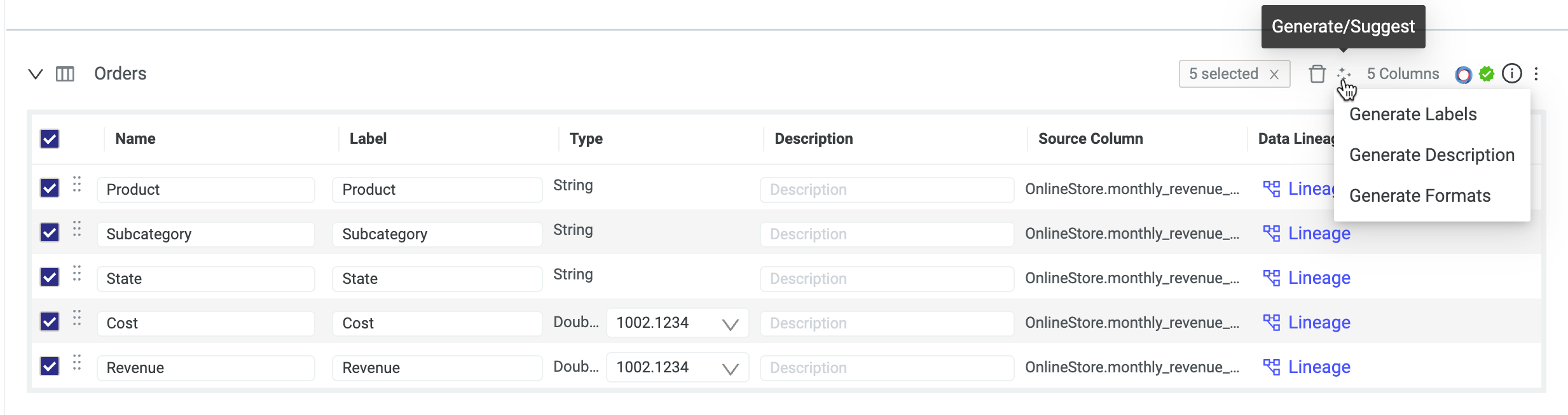
Choose the type of suggestion to apply: Generate Labels, Generate Descriptions, or Generate Formats.
NoteSelecting Generate Formats opens the Update Columns dialog, listing the columns and including a Show Dependencies option to view a column’s Data Lineage. Select Continue to apply or Cancel to discard changes.
Select Save Changes.
You must generate the Metadata Quality Report for the business view before applying any suggestions. The Generate/Suggest option will only function if a report already exists.
Metadata Quality Report capabilities
The report generated by Nexus using the /metadata-tune command provides a comprehensive overview of the quality of metadata associated with data tables and columns. This helps users understand the state of their data assets and identify areas for improvement. Key components and capabilities include:
Overview of Metadata Quality Analysis
Presents a structured analysis of metadata quality at both the Table and Column levels. It also includes any internal errors that may have occurred during the analysis process.
Table-Level Analysis
Provides insights into issues affecting the entire table, including recommendations for remediation actions to improve usability and performance. If no issues are detected, this section will indicate that the table meets quality standards.
Column-Level Analysis
Analyzes each column within the table for specific metadata quality issues. The report maps column names to their respective analysis results, detailing any identified issues and suggested actions for improvement. If no column-level analysis is performed, this section will reflect that.
Identified Issues
Categorizes metadata quality issues that can negatively impact data discoverability and usability. Common issues include:
- Fuzzy Duplicate Columns: Multiple columns with similar names or purposes, which can confuse users.
- Insufficient Descriptions: Missing or inadequate descriptions that do not provide meaningful context.
- Missing Format: Columns lacking proper display formatting and hindering readability.
- Vague Column Names: Generic or unclear names that make it difficult to understand the column's purpose.
- Missing Data Types: Columns without defined data types, which can lead to processing errors.
Recommended Actions
For each column with identified issues, the report provides an Actions Recommended section outlining the specific remediation actions suggested to improve metadata quality. These include:
- Rename To: Suggesting a more descriptive name for a table or column.
- Set Description: Adding or improving the description of a table or column.
- Set Format: Defining or improving the display format for a column.
- Set Label: Improving the display label for a column to enhance user experience.
By default, the report presents these actions for informational purposes to be applied manually. Some actions can also be applied automatically, refer to Implement suggestions for more information.